One universe
per node
Your rig needs more than 512 channels, or your fixtures sit in two different parts of the room? Connect one Art-Net node per universe and tell MyStrow which one gets what. Up to four universes, no lighting desk.
One universe = 512 channels = one DMX cable
A DMX universe carries 512 channels. A moving head in 16-channel mode uses sixteen, a pixel LED bar can take over a hundred: you run out quickly. The answer is a second universe, a second DMX line with its own 512 channels.
MyStrow handles four universes. With a four-output Art-Net node, each output already carries one universe. But many compact nodes — such as Electroconcept's single-universe Art-Net POE — only have one. In that case you use one node per universe, all on the same network, and MyStrow sends each one its own.
Available from MyStrow 3.2.2. Earlier versions sent all four universes to a single box: the second node stayed silent.
What you need
- One Art-Net node per universe — RJ45 or POE.
- A network switch between the PC and the nodes. For POE nodes, a POE switch powers them through the network cable.
- The manufacturer's utility to set each node's IP address and universe (DMX TOOLS for Electroconcept).
- One network cable per node, plus one for the PC.
Four steps
Give each node its own IP address
Nodes of the same model leave the factory with the same address: two of them on one network get in each other's way. With the manufacturer's utility, set them to 2.0.0.15, 2.0.0.16, 2.0.0.17 and so on. Do it one box at a time, with only that one connected.
Set each node's universe
First node on Art-Net universe 0, second on universe 1, and so on. That is the number MyStrow shows in the “Art-Net” column of the table. Some utilities count from 1: if a node stays silent, check this first.
Link each line to its node
In MyStrow, open Connection ▸ DMX Output, Node Output tab, and click ↻ to find the nodes. Pick the first one as main node. In the “Output routing” table, Sent to node column, pick the second node on line DMX 2, the third on line DMX 3… then click Connect.
Patch your fixtures in the right universe
In the patch, fixtures wired to the first node go in Universe 1, those on the second in Universe 2. DMX addresses start again at 1 in each universe.
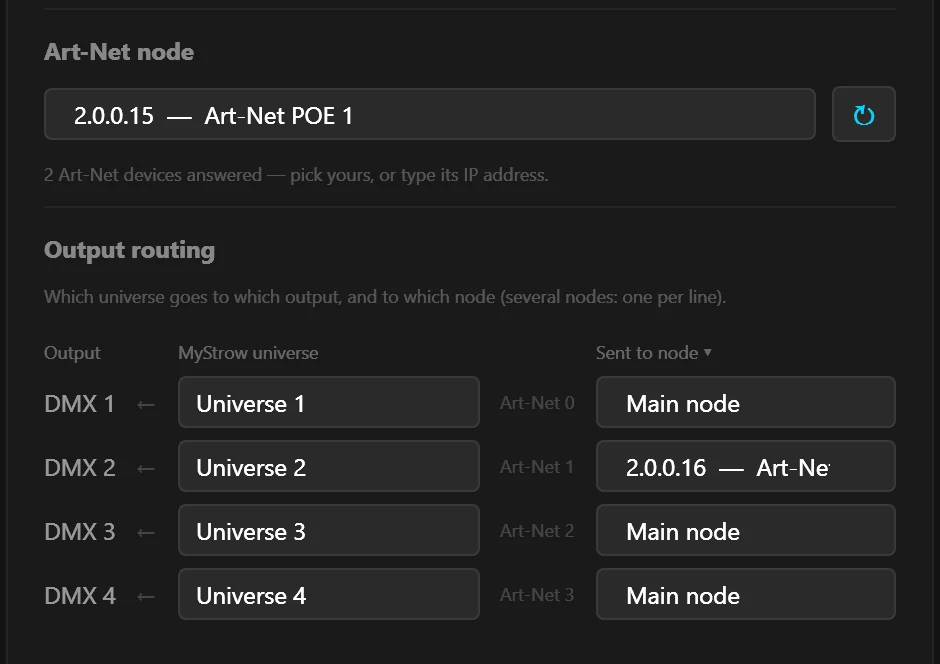
Four nodes, four universes
| Line | MyStrow universe | Art-Net universe | Node | IP address |
|---|---|---|---|---|
| DMX 1 | Universe 1 | 0 | Node 1 | 2.0.0.15 |
| DMX 2 | Universe 2 | 1 | Node 2 | 2.0.0.16 |
| DMX 3 | Universe 3 | 2 | Node 3 | 2.0.0.17 |
| DMX 4 | Universe 4 | 3 | Node 4 | 2.0.0.18 |
A line can also send the same universe as another one: that's mirror mode, handy to duplicate a DMX line at the other end of the room without a splitter.
What doesn't work
| Hardware | Several universes? | Why |
|---|---|---|
| RJ45 or POE Art-Net nodes | ✅ Up to 4 | Each has its own network address: MyStrow sends every node its universe. |
| 2- or 4-output Art-Net node | ✅ Up to 4 | One box is enough: each output already carries a universe. |
| USB-DMX interfaces (Open DMX, Enttec, MS-DMX…) | ❌ Only one | MyStrow drives one USB port at a time. Plugging in four interfaces does not give four universes. |
| Several Electroconcept USB NODEs | ⚠️ Not recommended | Each box creates its own network adapter, all with the same factory address: the PC no longer knows which one to talk to. |
If a node stays silent
- The second node doesn't light up: check that its universe matches the “Art-Net” number on its line. If the utility counts from 1, try the next number.
- Only one node answers the search: both probably have the same IP address. Change one, with only that box connected.
- Node 2's fixtures react to node 1's settings: they are patched in the wrong universe. Open the patch and move them to Universe 2.
- No node answers: the PC's network adapter must be on the 2.x.x.x network. The node setup guide explains how.
More channels, no lighting desk
Download MyStrow, plug your nodes into a switch and spread your fixtures across four universes.